
We compared 18 transcription apps using messy real-world audio. Discover which tools nailed accuracy, which failed badly, and the best free options in 2026.
We Tested 18 Tools So You Don't Have To
If you have ever spent an hour typing up notes from a meeting that just ended, or tried to recall a key detail from a call three days ago, transcription software exists to solve exactly that problem.
The hardest question is which tool actually works in real conditions, not just in a polished product demo.
We did not rely on spec sheets or vendor claims. Over three weeks, we ran 18 transcription tools through 45+ hours of real audio.
That included 12 team meetings across Zoom, Google Meet, and Teams, 8 university lectures, 15 one-on-one interviews, and 10 café recordings with genuine background noise.
Testing happened on Mac, Windows, iOS, and Android. We included Indian, British, and American accents on purpose, and tested with both high-quality microphones and standard phone speakers.
Ten tools made the cut. The other eight had accuracy problems, broken features, or pricing that made them impractical for consistent everyday use. This guide covers only the ones that held up under real conditions.
The AI transcription market grew rapidly in 2024, reaching an estimated $4.5 billion as more people started using voice-to-text tools for meetings, lectures, interviews, and content creation.
With remote work and AI note-taking becoming part of everyday work life, there are now more transcription apps than ever. That also makes honest, real-world comparisons more important so people can choose the right tool for their actual needs.
Editor's Note: Full disclosure we created VoiceToNotes. We feature it because it works. But we are not here to waste your time with a fake review. We tested the top competitors fairly so you can find exactly what you need.
Learn more about how we select apps for our best apps lists.
What Are AI Transcription Services?
Transcription software converts spoken audio into written text, either through AI using Automatic Speech Recognition, also called ASR, or through human transcriptionists.
Modern AI-powered tools handle this in real time, turning meetings, lectures, interviews, and voice memos into searchable, editable documents within seconds.
The accuracy gap between AI and human transcription has narrowed significantly in the last two years.
For most everyday use, AI transcription is now good enough to be genuinely useful with only light editing afterwards.
Where it still struggles: heavy background noise, simultaneous speakers, strong regional accents, and situations where every word legally or professionally matters.
How Does AI Transcription Work?
When you speak into a device or upload an audio file, the software sends that audio to ASR models trained on large speech datasets. The model listens to speech patterns, predicts likely words from context, and applies formatting based on sentence structure and natural pauses.
Advanced systems account for accents, dialects, and domain-specific terminology. Some tools also perform speaker diarization, which automatically labels who said what. That feature is particularly valuable for interviews, group meetings, and multi-person panels.
Real-time transcription tools display text almost instantly as you speak. File-based systems typically process a recording within a few minutes. Newer tools built on OpenAI's open-source Whisper model offer on-device or local-first processing, which matters when you are handling sensitive audio and don't want data leaving your machine.
Quick Verdict: Best Transcription Software by Use Case
Before going deeper, here is where each tool genuinely wins in 2026.
- Best transcription software overall for solo users and students: VoiceToNotes.ai
- Best live transcription app for team meetings: Otter.ai
- Best podcast transcription software: Descript
- Best for privacy-sensitive calls: Jamie.ai
- Best speech to text software for legal accuracy: Rev or GoTranscript
- Best AI meeting assistant for analytics: Fireflies.ai
- Best for multilingual transcription: Notta
- Best automatic transcription software for file archives: Sonix
Best free transcription software for daily use: VoiceToNotes.ai
If you also want to compare more speech to text tools, see our full breakdown of the 14 Best Voice to Text Apps for students, creators, and professionals .
The True Benefits of Using AI Transcription
Why are so many professionals abandoning manual note-taking? The benefits go far beyond simple convenience.
- Massive Time Savings: Transcribing a one-hour interview manually takes a human about four hours. AI software does it in less than three minutes.
- Cost Reduction: Traditional human transcription costs dollars per minute. AI transcription costs mere pennies and often comes free with basic plans.
- Searchable Archives: Once an audio file becomes text it becomes searchable. You can instantly find a specific quote from a meeting that happened six months ago.
- Content Repurposing: Creators can turn a single YouTube video into a blog post, a newsletter and multiple social media updates just by using the transcript.
- Accessibility: Transcripts make content accessible to people who are deaf or hard of hearing and they help non-native speakers understand complex topics.
Limitations of AI Transcription
AI is incredibly powerful but it is not magic. You need to understand its limitations before you trust it with your most important work.
- The Crosstalk Problem: When three people laugh and talk over each other AI often produces scrambled text or misses entirely what was said.
- Heavy Accents and Jargon: Deeply technical industry jargon or very thick regional accents can still confuse even the best AI models.
- Lack of Human Nuance: AI does not always understand sarcasm tone or emotional context. It might transcribe a joke as a serious statement.
- Security and Privacy: Uploading sensitive company meetings to a third-party server always carries some level of data risk. You must choose tools with strict privacy policies.
We experienced these exact frustrations ourselves, so we built VoiceToNotes to solve them directly.
Instead of handing you scrambled text from crosstalk or misheard jargon, our Voice to text software platform uses smart AI cleanup to turn messy audio into clean, readable bullet points.
We added custom AI prompts so you can easily preserve the right tone and context. We also built the entire system with bank-level encryption and local storage options so your sensitive ideas always stay totally private.
Which Transcription Tools Are Best For Whom?
Choosing the best AI transcription service depends entirely on what you are trying to achieve.
- For thinkers and busy professionals: You need a tool that captures raw ideas and turns them into structured notes. VoiceToNotes is designed exactly for this.
- For corporate teams: You need a meeting assistant that joins your calls and sends out summaries. Otter and Fellow lead this category.
- For video creators: You need a tool where the transcript connects directly to your video timeline. Descript is the industry standard here.
- For legal or medical professionals: You need guaranteed accuracy and high security. Rev and GoTranscript offer human-review layers for this exact reason.
Research and Case Study: The Data Behind The Shift
Recent data proves that transcription software is reshaping the modern workplace. According to a recent research report by Market.us, the AI transcription market is projected to grow from $4.5 billion in 2024 to an incredible $19.2 billion by 2034.
This massive growth is driven by a leap in accuracy. A case study evaluating top transcription models showed that optimal AI engines now reach up to 99 percent accuracy in quiet environments.
For a mid-sized marketing agency in the study switching from manual notes to automated meeting transcription saved their project managers an average of six hours per week.
That time was redirected into actual client strategy resulting in a measurable increase in overall agency output.
The Best Transcription Software of 2026: Honest Reviews
Here is our detailed breakdown of the top tools on the market today. We evaluate their features strength pricings and limitations so you can make an informed choice.
1. VoiceToNotes.ai: Best Overall Real Time Transcription Software for Solo Users, Students, and Creators
If you want the best transcription app that works immediately without complex setup, VoiceToNotes.ai is the most practical starting point for most individual users.
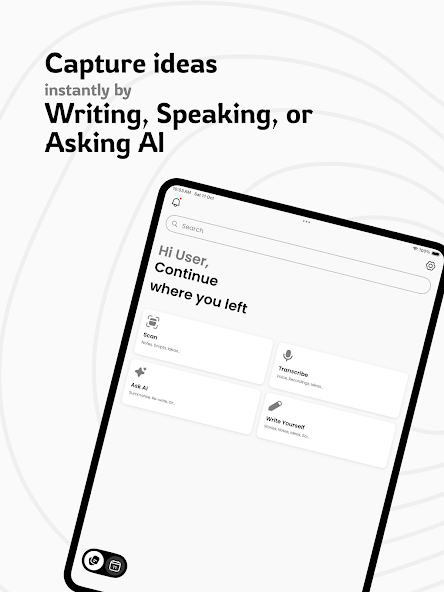
The core experience is simple. You open the app, hit record, and start speaking. Transcription appears in real time on screen. When you stop, AI formatting kicks in automatically and organizes your words into headers, bullets, and clean paragraphs.
From there, content repurposing tools let you convert that voice note into a blog post, essay, email draft, or custom-prompted summary in seconds.
For content creators, this is genuinely useful. A 10-minute voice memo can become a structured first draft without starting from a blank page.
How to Get Started with Transcription Software
The setup process depends on which type of tool you choose.
For live transcription apps like VoiceToNotes.ai, create a free account, open the dashboard, hit record, and speak. Transcription appears in real time on screen. When you stop, AI formatting applies automatically.
Review, edit, save to folders, or use the AI tools for summaries, emails, or blog drafts. On Android, disable battery optimization for the app or recording may pause when your screen times out.
For meeting bots like Otter.ai, connect your Google Calendar and Zoom account during onboarding. The bot deploys automatically to meetings on your calendar with no manual trigger required per meeting. For bot-free tools like Jamie.ai, install the desktop app, grant system audio permissions, and click record when you join a call.
For file uploads, click upload, select your audio or video file in MP3, WAV, M4A, or MP4 format depending on the tool, wait a few minutes for processing, then review and export as PDF, Word, or plain text.
Start with a free plan. Record a typical session in your actual environment, whether that is a meeting, a lecture, or a voice note, and review accuracy, formatting quality, and how much manual editing is actually required before committing to anything. Advertised accuracy numbers mean less than what you experience with your own audio in your own conditions.
Once you have chosen a tool, connect it to your existing workflow using native integrations or Zapier automation. Set up folder structures and naming conventions from day one. Transcripts become difficult to use as a searchable archive if they are not organized consistently from the start.
Frequently Asked Questions
Is AI transcription accurate enough for real use?
Yes, for most everyday use cases. Leading transcription tools typically achieve 94 to 99% accuracy on clean, single-speaker audio. Accuracy drops meaningfully with overlapping speakers, heavy background noise, or strong regional accents. For legal, medical, or published content where every word matters, human review services remain the safer standard.
What is the best transcription software for students?
VoiceToNotes.ai is the strongest option for most students. It handles lecture recording well, formats notes automatically, and the Essay and Summarize tools are directly useful for studying and paper writing. For group study sessions where knowing who said what helps, Otter.ai's free tier adds speaker labeling on top. Both have free plans practical for student budgets.
What is the best free transcription software?
VoiceToNotes.ai offers 10 free notes per day with daily resets, which is the most generous free transcription software option for individual daily use. Otter.ai's 300 minutes per month is the most practical free option for team meeting transcription. Fireflies.ai offers unlimited transcription minutes but caps total storage at 800 minutes before old files auto-delete.
Can transcription software work offline?
Most mainstream tools require internet access. They process audio on cloud servers, so offline recording is possible on some apps but transcription will not complete until you reconnect. Tools built on OpenAI's open-source Whisper model can run fully on-device with no data transmission, but they require technical setup and lack cloud-based formatting features.
What is the difference between dictation software and transcription software?
Dictation software types as you speak directly into whatever app you are using, in real time. Transcription software records audio and converts it into a structured document with summarization, speaker labels, timestamps, and organization tools. Some tools handle both, but they are optimized for different workflows and different use cases.
What are the best Otter.ai alternatives?
Jamie.ai for privacy and invisible recording on sensitive calls. Fireflies.ai for meeting analytics and cross-meeting insights. VoiceToNotes.ai for solo note-taking, content creation, and everyday voice to text app use on a tighter budget. Each addresses a different gap in what Otter.ai provides.
Which is the best speech to text app for interviews?
Rev's hybrid service is the most accurate for interviews where published attribution matters and every word must be right. Notta works well for multilingual interviews where real-time translation helps. For research interviews where speed matters more than perfection, Otter.ai's speaker diarization and searchable archive work for most use cases.
Is transcription software safe for sensitive conversations?
It depends on the tool and your use case. Most cloud-based tools encrypt audio in transit and at rest but process it on third-party servers. Jamie.ai offers the most discreet recording approach with no bot and system-audio capture only. For HIPAA-sensitive conversations, verify BAA availability before recording anything. For maximum privacy, on-device tools built on Whisper keep audio entirely local but require technical setup.
What is automatic transcription software?
Automatic transcription software uses AI to convert audio to text without human involvement. You upload a file or record live, and the tool returns a transcript within seconds or minutes depending on the file length. Quality varies by tool, recording environment, and audio clarity. Most everyday use cases are well-served by automatic transcription with a light editing pass afterwards.
What is the best voice memo transcription app?
For iPhone, iOS Voice Memos offers built-in transcription that stays fully on-device. For more structured output with AI formatting and note organization, VoiceToNotes.ai handles voice memo transcription and adds content repurposing tools on top. For Apple ecosystem users who want multilingual support and cross-device sync, Voicenotes.com integrates more deeply but costs significantly more per month.
What is the best software for transcription of podcasts and videos?
Descript is the best podcast transcription software and the only tool on this list specifically built for video transcription workflows. The others produce transcripts useful for show notes, captions, or SEO content, but they do not offer transcript-based audio editing. For podcast production specifically, Descript is the tool worth learning properly.
Does VoiceToNotes.ai work for meeting transcription?
VoiceToNotes.ai works for meetings that you manually trigger recording for, including in-person meetings and ad-hoc calls where you control the recording. It does not auto-join scheduled Zoom or Google Meet calls the way Otter.ai does. For meetings where you can remember to hit record, it works well. For automated calendar-based coverage of every scheduled call, Otter.ai is the best fit.
Conclusion
AI transcription has genuinely matured. In 2026, accuracy for clean single-speaker audio is strong enough that most everyday use cases do not require human review anymore. The tools diverge significantly in harder conditions: overlapping speakers, noisy environments, sensitive external calls, and specialized professional contexts like legal or medical documentation.
There is no single best transcription software for everyone. VoiceToNotes.ai is the most practical and affordable clearest winner starting point for solo users, students, freelancers, and content creators who want live transcription with content repurposing tools and do not need automated bot coverage of every scheduled meeting.
Otter.ai is for teams running recurring structured calls. Jamie.ai solves the privacy problem that bot-based tools create. Descript is in its own category for podcasters and video creators. Rev and GoTranscript exist for when accuracy is non-negotiable.
The most useful advice: start with a free plan, test it with your own audio in your own environment, and be honest about what you will actually use consistently. Benchmark scores and feature lists matter far less than whether the tool fits naturally into your workflow without creating friction. The best transcription software is the one you use every single day, not the one with the most impressive benchmark number.

 English
 Arabic
 French
 Spanish
 Portuguese
 Deutsch
 Turkish
 Dutch
Dutch
 Italiano
 Russian
 Romaian
 Greek
Greek